Amazon SEO: How to Find the Keywords Your Listing Is Missing
Introduction
If your Amazon listing isn't ranking where you'd expect for the terms you assume people are searching, the most likely explanation isn't poor product quality or weak reviews — it's that your title and bullet points simply don't contain the words shoppers are actually typing into the search bar. Amazon SEO works differently from Google SEO. The algorithm matches listings to search terms based largely on the text within the listing itself. A gap in your Amazon keywords is a gap in your visibility, regardless of how good the product is.
What we'll cover:
- How Amazon's search algorithm actually works
- Where to find real Amazon keyword search volume
- How to audit your current title and bullets for keyword gaps
- A real example of keyword gap analysis in practice
- Building a stronger title without keyword-stuffing
- How to tell if your Amazon SEO changes are working
How Amazon's search algorithm actually works
Unlike Google, Amazon's search is built entirely around purchase intent. When a shopper searches a term, Amazon looks for listings whose title, bullet points, and backend search terms most closely match that query, then ranks results by relevance combined with sales performance and conversion history.
This means two things matter equally: getting the right keywords into your listing, and converting well once you're found. A keyword fix alone won't fix a listing with weak images or poor reviews — but without the right Amazon keywords, you may never get found in the first place.
Where to find real Amazon keyword search volume
Several free and low-cost tools let you check search volume for Amazon-specific keywords, separate from general Google search volume (the two often differ significantly). Tools such as Helium 10, Jungle Scout, and Amazon's own Brand Analytics (available to Brand Registry members) show:
- Estimated monthly search volume for a given term on Amazon
- Related or "long-tail" variations of your main keyword
- Which of your competitors are already ranking for each term
Start broad — your core product category — then narrow into more specific variations (material, use case, audience) to find terms with meaningful volume that aren't yet saturated with competition.
How to audit your current Amazon listing for keyword gaps
Take your current listing title and list every distinct word in it. Then take your top 10–15 keyword candidates by search volume. Compare the two lists:
- Which high-volume keywords are completely absent from your title?
- Which appear only partially (e.g. "hair removal" present but "hair removal device" missing the qualifying word)?
- Are any words in your current title low-value filler that could be replaced with a higher-volume term?
This comparison alone often reveals tens of thousands of monthly searches a listing isn't currently eligible to appear in, simply because the matching words aren't present.
A real example of keyword gap analysis
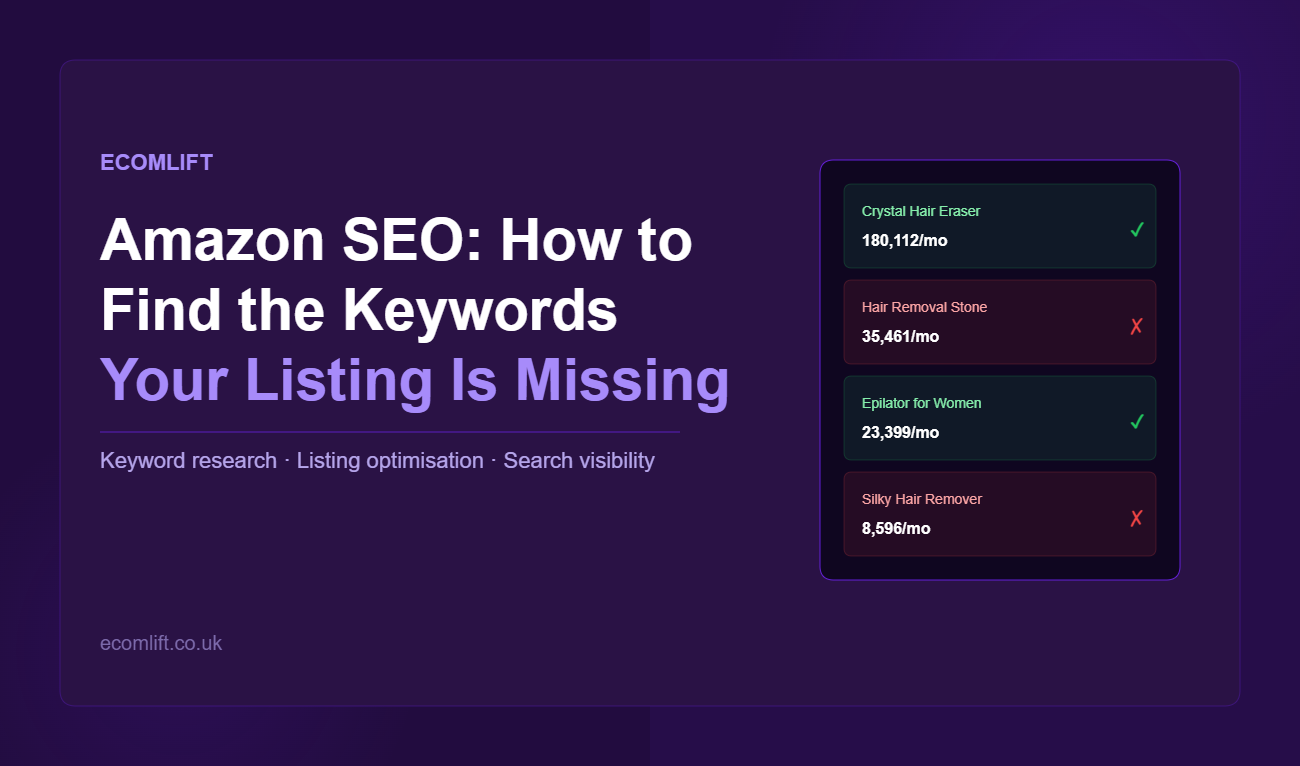
A brand selling a crystal hair removal product had the title: "Crystal Hair Eraser | Hair Removal Epilator Device | Magic | Black." A keyword audit found the following:
- "Crystal Hair Eraser" — 180,112 monthly searches — present in title ✓
- "Hair Removal Stone" — 35,461 monthly searches — not in title ✗
- "Epilator for Women" — 23,399 monthly searches — partially present ✓
- "Silky Hair Remover" — 8,596 monthly searches — not in title ✗
By restructuring the title to include the missing high-volume terms, the listing became eligible for an additional 79,000+ monthly searches overnight — without changing the product, price, or imagery. This is the type of visibility gap that Amazon SEO keyword research consistently uncovers.
Building a stronger Amazon title without keyword-stuffing
The temptation once you see the gap is to cram every keyword into the title. Resist this — Amazon titles have character limits, and an unreadable, stuffed title hurts conversion even if it technically improves search matching.
A stronger approach: prioritise your top three to five keywords by search volume, then write a title that reads naturally while including them. Lower-priority keywords can usually live in the bullet points or backend search terms instead, where they still contribute to matching without compromising readability.
How to tell if your Amazon SEO changes are working
After updating a title, monitor:
- Impressions and click-through rate in Amazon's advertising or Brand Analytics reporting
- Organic ranking position for your target keywords over the following 2–4 weeks
- Overall session and traffic trends on the listing
Amazon's indexing isn't instant — give changes at least one to two weeks before judging the impact, and avoid changing multiple variables (title and images, for example) at the same time if you want to isolate what's actually moving the needle.
At Ecomlift, we help established brands take back control of their Amazon channel, from listing optimisation and keyword strategy to pricing and advertising, so you can protect your margins and build a stronger, more stable presence on the marketplace.
Frequently asked questions
Do backend search terms still matter for Amazon SEO if my title and bullets are strong?
Yes. Backend search terms are a place for relevant synonyms, alternate spellings, or related terms that don't fit naturally into customer-facing copy. They're indexed by Amazon but not visible to shoppers.
Will changing my listing title affect my existing reviews or ranking history?
No — your reviews and sales history stay with the listing regardless of title changes. Ranking can shift, but based on the new relevance and performance, not because history was lost.
How often should I revisit my Amazon keyword strategy?
Search behaviour and competition shift over time, so a periodic review — particularly after major listing changes or seasonal shifts in your category — is worth building into a regular routine rather than treating as a one-off task.
What's the difference between Amazon SEO and Google SEO?
Google SEO optimises for informational and navigational search intent across a broad range of content types. Amazon SEO optimises exclusively for purchase intent — every search on Amazon is from someone looking to buy something. This means keyword research needs to be done specifically for Amazon's search data, not Google's, as the most-searched terms often differ significantly between the two platforms.
Where should I put keywords I can't fit in the title?
Bullet points and backend search terms are your next priorities. Bullet points are customer-facing and contribute to search matching — include keywords naturally within benefit-led copy rather than as a list of terms. Backend search terms (in Seller Central under your listing's keywords tab) are not visible to customers but are indexed by Amazon.
Can too many keywords hurt my listing?
Keyword stuffing — forcing so many terms into a title that it becomes unreadable — can hurt conversion rate even if it improves search matching. A listing that doesn't convert well will rank lower over time as Amazon's algorithm deprioritises it. Balance keyword coverage with readability.
SIGN UP TO OUR
NEWSLETTER
Subscribe to the Sell Smarter newsletter to get weekly e-commerce insights, Amazon best practices and exclusive tips from our expert team. Delivered straight to your inbox.